Payments in a Telegram Bot
A telegram payment bot has to answer one question before any other: what are you selling? Telegram's own rules split commerce inside the messenger into two worlds — digital goods, which must be sold through Stars, and physical goods and services, which run through external payment providers. This page is the hub: the two rails, the fees in one table, and how to switch payments on in your store.
Two rails: Stars vs external providers
The split is not the platform's choice and not a pricing trick — it is Telegram's platform policy:
- Digital goods — files, keys, access, subscriptions, anything delivered inside Telegram — must be sold via Telegram Stars when the sale happens inside a bot or Mini App. That is the rule; the Stars rules guide translates the official terms into plain language.
- Physical goods and real-world services run through the Payments API: Stripe where it is available, and local acquiring rails elsewhere (ЮKassa for the Russian market, regional providers as connected). Card, cash-on-delivery-style flows and bank rails live on this side.
Mixed catalogs — a cafe selling both merch (physical) and a digital recipe book — simply assign a rail per product in the same settings screen.
Digital goods: how Stars work
The buyer pays with Stars, Telegram's in-app currency. The mechanics from the seller's side:
- The buyer's price is denominated in Stars; one Star costs the buyer roughly $0.013 depending on the store they buy Stars from.
- The platform's take on Stars transactions is about 35% against the buyer's price — the number to internalize before pricing digital goods. A product the buyer pays 100 Stars for nets the seller roughly 65 Stars' worth.
- Payouts convert to TON, with a hold of up to 21 days on earned Stars before they become withdrawable.
- Pricing rule of thumb: to net a target amount, divide it by 0.65 and price in Stars from there. The Stars calculator runs this arithmetic interactively, and the digital vs physical guide works the full unit economics on a $10 product.
Physical goods: Stripe and local providers
The external-provider rail behaves like ordinary e-commerce acquiring:
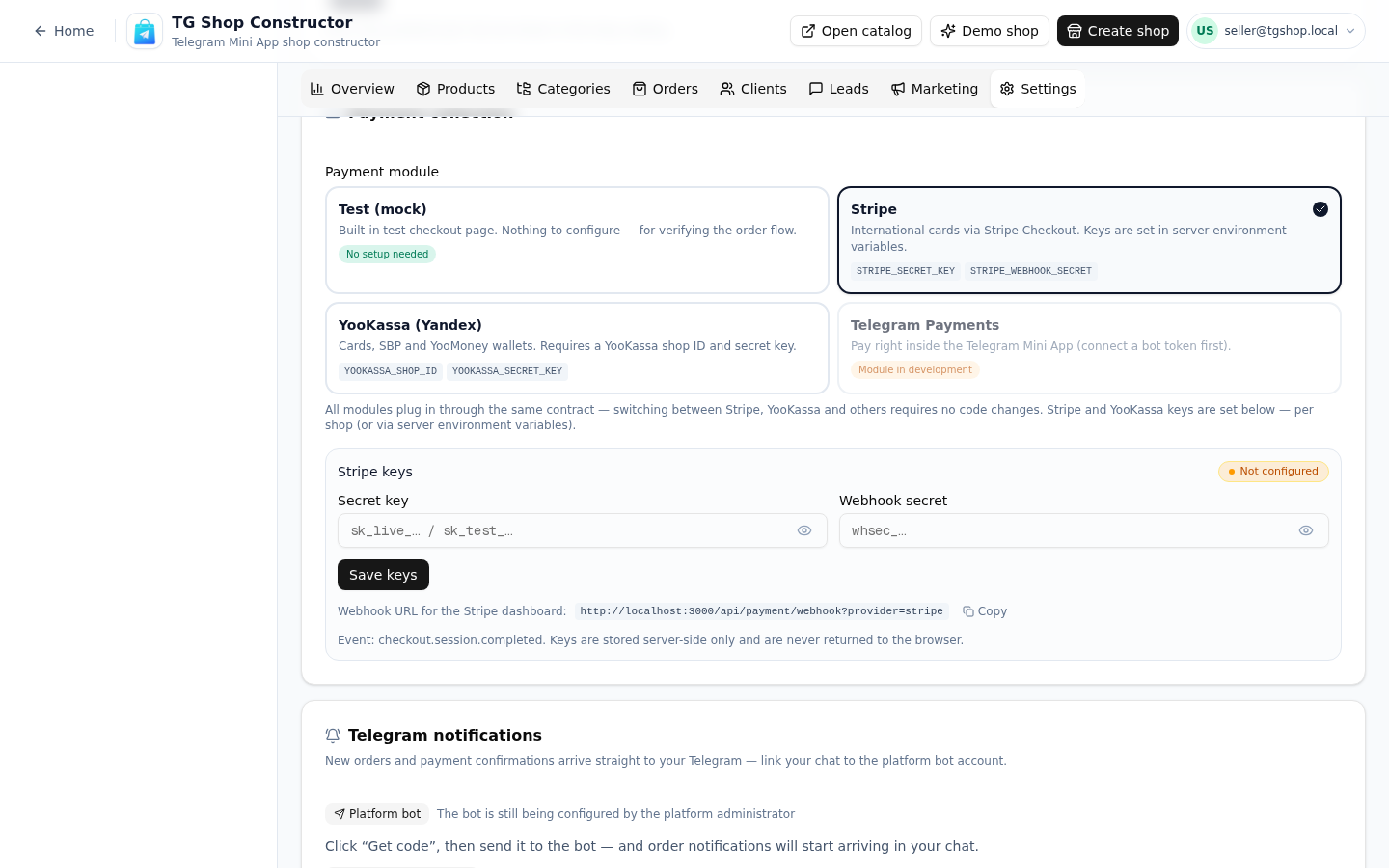
- Stripe — cards worldwide where Stripe operates; connect by pasting API keys into the payment settings screen shown above. You need a business entity for a Stripe account.
- ЮKassa and local rails — regional acquirers for markets where Stripe is not the answer; connected in the same screen, per shop.
- Fees are the provider's standard acquiring fees (typically 1.5–3.5% + a fixed amount for cards), on top of the platform's plan-based share of processed volume.
- Money settles to your provider account on the provider's normal schedule — no TON conversion, no Stars hold.
The payment gateway page details the connection flow country by country, including the honest list of where each rail works and where it does not.
Fees and payouts compared
| Stars (digital) | External providers (physical) | |
|---|---|---|
| Required for | digital goods inside bots/Mini Apps | physical goods, services |
| Buyer pays with | Stars (~$0.013 each) | card / bank rail |
| Platform take | ~35% of buyer price | 0–2.5% by plan |
| Provider fees | — (in the take) | acquiring, typically 1.5–3.5% + fixed |
| Payout | TON, up to 21-day hold | provider's normal settlement |
| Chargebacks | not applicable | provider's dispute flow |
The honest reading: digital goods trade a heavy take for zero fraud surface and instant delivery inside Telegram; physical goods keep full payment freedom but inherit ordinary acquiring life. Neither rail is "better" — they answer to different product categories, and the choice is made per product, not per store.
Choosing the rail for a mixed catalog
The worked decisions sellers actually face:
- The bakery with a recipe PDF. Bread goes on the card rail (physical, provider fees, next-day settlement); the recipe book goes on Stars (digital, the 35% take, TON payout). Two products, two rails, one settings screen — the catalog does not care.
- The tutor selling consultations. Sessions delivered in chat are digital-adjacent: Stars. Sessions in a physical office: the card rail. The boundary is where the service happens, and both products can live in the same shop.
- The merch store adding a digital sticker pack. The hoodie was never the question — physical rail. The sticker pack for buyers' chats is a digital good inside Telegram: Stars, priced with the 0.65 rule so the take does not eat the margin.
- The seller in a Stars-blocked market (Germany is the live example): digital goods inside bots effectively cannot be sold there — the honest catalog move is a physical product or a web checkout outside the bot. The Stars rules guide keeps the country list current.
One more practical note on timing: card-rail money settles on your provider's schedule and lands as ordinary business income; Stars money has the hold and lands in TON. Shops with both rails running should track them as two separate receivables lines — the cabinet's order history already splits them by payment status and module.
How to enable payments in your store
- Open the shop's Settings → Payment collection.
- Pick the module per rail: the Stars module for digital products, Stripe/ЮKassa for physical ones.
- For providers, paste the API keys from your provider dashboard (the screen above shows the Stripe panel).
- Save — the platform validates the configuration with a test handshake before the first buyer sees the checkout.
- Place a one-order test purchase yourself: mark it paid, watch the status flow, check the receipt link.
The whole sequence is a settings screen, not an integration project — the difference between a telegram payment bot configured in an afternoon and a custom build where "add payments" is a two-week line item. Banking questions — taxes, entities, invoices — are yours and your accountant's; the free plan includes the payment settings screen, so the entire flow can be rehearsed before any money moves.
Telegram Stars fee calculator
Approximate calculation. Telegram keeps its Stars commission; payouts arrive in TON.
Pricing
Старт
Free
- 1 магазин и до 15 товаров
- Конструктор каталога с категориями
- Витрина-ссылка для Telegram-канала
- Приём заказов и корзина
- Тестовая оплата (мок)
Pro
690 ₽/mo
- 3 магазина и до 150 товаров
- Онлайн-оплата: Stripe и ЮKassa
- Электронные чеки с юр. данными
- Галереи до 5 фото у товара
- Канбан заказов и статусы доставки
Бизнес
1,490 ₽/mo
- Неограниченные магазины
- До 1000 товаров
- Всё из тарифа Pro
- Расширенная аналитика продаж
- ИИ-ассистент на витрине
All plans include the catalog, orders and a PWA storefront.
FAQ
Related pages
Create your Telegram shop in 10 minutes
Free plan, no credit card. Add products, share the link in your channel and take orders.
Start for free