Payment Gateway for Telegram Stores
A telegram payment gateway is the bridge between your store's checkout and the buyer's money: card payments, local rails and webhooks, connected to the bot without writing integration code. This page covers what a gateway does in Telegram, how the Stripe connection looks in practice, and which local rails matter in which country.
The rule that decides your rail comes from the app stores, not from the sellers: digital goods are paid with Telegram Stars; physical goods are paid through payment providers — Stripe and the country-specific gateways. If you sell anything that ships in a box, this page is your setup manual; for digital goods, start with the Stars payments math.
What a payment gateway does in Telegram
Telegram's payment flows hand the checkout to a provider: the buyer taps "pay", a native payment sheet opens inside the chat with the amount and the method, and the money routes through the provider's acquiring to your account. The bot receives a signed webhook, the order flips to "paid" — no card numbers ever touch your bot.
What that buys you as a seller:
- checkout without leaving Telegram — the sheet opens in-place, on mobile and desktop;
- provider-grade acquiring — 3-D Secure, refunds, disputes handled by the provider;
- per-shop credentials — each store connects its own keys, so multi-store accounts stay isolated;
- webhook confirmation — the order status is set by the provider's signed callback, not by the buyer's word.
Stripe: setup in 5 steps
Connecting Stripe takes one settings screen. In the shop cabinet, open Settings → Payment collection and pick the Stripe module:
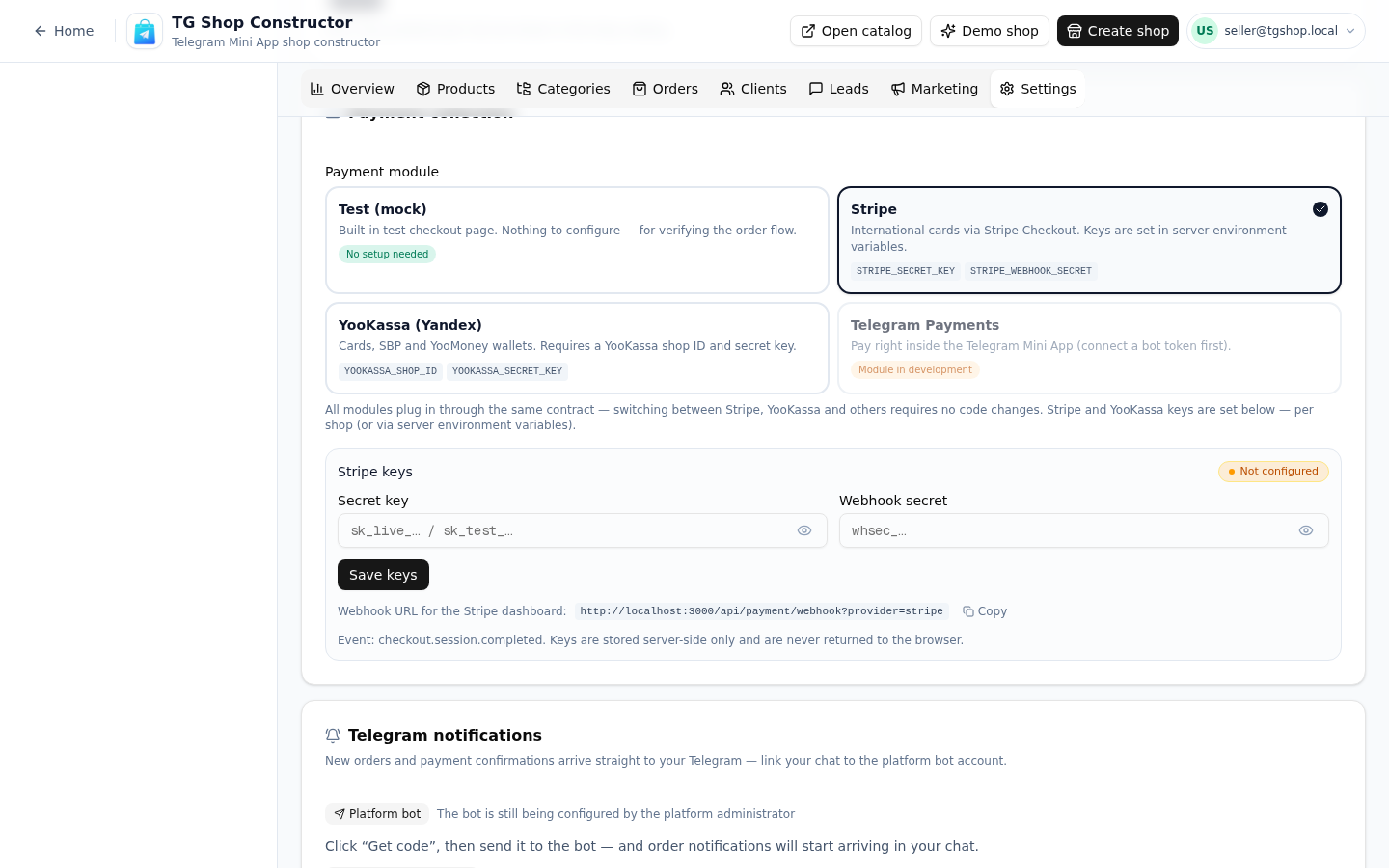
Then:
- Pick the module. Select Stripe in the payment-module picker (shown above) — the shop switches its checkout rail per store, not per account.
- Paste the keys. Secret key and publishable key from your Stripe dashboard go into the per-shop fields; secrets are stored server-side and never come back to the browser.
- Copy the webhook URL. The settings screen shows your shop's webhook endpoint — register it in Stripe's webhook settings to receive signed payment events.
- Place a test order. Buy the cheapest item yourself and watch the order flip to "paid" in the feed — two minutes that catch every misconfiguration.
- Go live. Switch the keys to live mode when the test passes; the flow your buyers see does not change.
Local rails by country: Stripe covers 46 jurisdictions (most of Europe, the US, Brazil, Mexico and more); Brazil adds PIX; Indonesia runs on QRIS; Turkey on iyzico; Kazakhstan on Kaspi. The full comparison of rails and fees lives in the payment methods overview, while the economics of the digital-goods rail are on the Stars calculator page.
Fees overview
Three layers, each visible before you commit:
- the platform's commission — 0–2.5% depending on the plan tier, on top of acquiring, charged on processed volume;
- acquiring — the provider's standard fee per card payment (Stripe's is region-dependent, typically 1.5–3.5% + fixed);
- currency conversion — when the buyer's currency differs from your settlement currency.
The practical advice: compute your all-in cost per order before pricing, the same way the Stars page teaches for digital goods. Sellers who argue about the platform's 2% while paying 35% on Stars for digital sales are optimizing the wrong line.
Which gateway should you pick
Start with what your country supports: Stripe where it is available — one dashboard, sane webhooks, honest docs; the local rail where it is not — PIX in Brazil, QRIS in Indonesia, iyzico in Turkey, Kaspi in Kazakhstan. The buyer trusts the local name more than a foreign card form, and the conversion numbers show it.
To see the whole rails map — including the Shopify-versus-Telegram question for existing store owners — read the honest Telegram vs Shopify comparison. To connect and sell today, the free plan includes the gateway settings for one store; the telegram shop bot builder page explains the storefront the gateway plugs into.
Telegram Stars fee calculator
Approximate calculation. Telegram keeps its Stars commission; payouts arrive in TON.
Pricing
Старт
Free
- 1 магазин и до 15 товаров
- Конструктор каталога с категориями
- Витрина-ссылка для Telegram-канала
- Приём заказов и корзина
- Тестовая оплата (мок)
Pro
690 ₽/mo
- 3 магазина и до 150 товаров
- Онлайн-оплата: Stripe и ЮKassa
- Электронные чеки с юр. данными
- Галереи до 5 фото у товара
- Канбан заказов и статусы доставки
Бизнес
1,490 ₽/mo
- Неограниченные магазины
- До 1000 товаров
- Всё из тарифа Pro
- Расширенная аналитика продаж
- ИИ-ассистент на витрине
All plans include the catalog, orders and a PWA storefront.
FAQ
Related pages
Create your Telegram shop in 10 minutes
Free plan, no credit card. Add products, share the link in your channel and take orders.
Start for free