No-Code Telegram Shop Builder
A telegram shop builder with no code in the way is the entire pitch: products, prices, photos, themes and checkout are set up in a visual editor, and the seller never opens a terminal, a config file or a deployment panel. This page is an honest tour of what "no-code" covers here — and of the one two-minute step where Telegram itself asks for your attention.
What no-code means here
Three promises, kept literally:
- No programming. The store is assembled from forms: a product card is a name, a price, a description, up to five photos and optional variants. Nothing else is required — there is no template language, no "advanced mode", no escape hatch that turns out to be mandatory.
- No servers. Hosting, TLS certificates, updates and backups are the platform's problem. The bot, the storefront and the admin cabinet run on managed infrastructure; the seller's month contains zero minutes of DevOps.
- No deployment pipeline. Changes go live the moment you save them. Edit a price at 9:00, and the 9:01 buyer sees the new price — no build step, no publish button, no review queue.
What no-code does NOT mean here: it does not mean "no BotFather ever" — and that honest distinction is the next section.
The visual editor tour
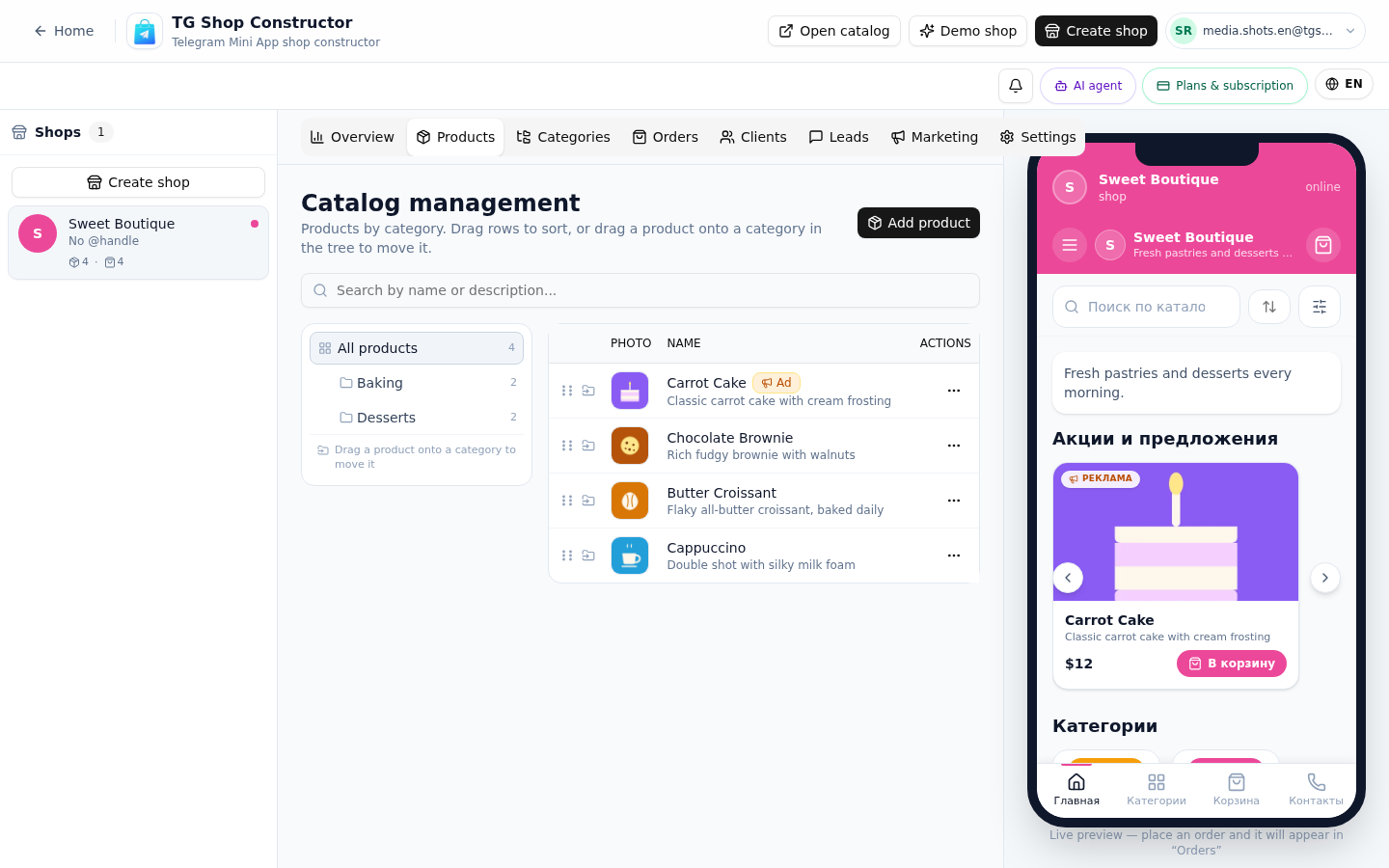
The constructor is a split screen. The left side is the editing form; the right side is a live Telegram-styled preview of the storefront that updates as you type.
A typical first session:
- Create the shop — name, description, theme color. The preview on the right re-themes instantly.
- Add categories — "Sneakers", "Hoodies", or whatever your assortment is. Categories become the storefront's navigation.
- Add products — each card takes about a minute: name, price, description, photos, variants ("Size: XL, +200 ₽"), and stock tracking if you want it. Stock can also be off entirely for made-to-order goods.
- Connect payments — pick the module per product category: Stars for digital goods, a card provider for physical ones.
- Pin the bot — the storefront opens inside Telegram as a Mini App and in any browser as a PWA.
The mini app builder page explains what the buyer-side application actually is — and why it never needs an app store. If you want the whole launch timed to the minute, the launch in 10 minutes guide runs the checklist with a live timer.
The one technical step: your bot token
Telegram requires every bot to be registered by its owner — no platform can create a bot on your behalf. The honest flow:
- If you have no bot yet: open @BotFather, send /newbot, pick a name and a username. That is the whole conversation — two minutes with the checklist open.
- If you already run a bot (a channel assistant, an old experiment): keep it. Paste its existing token into the shop settings and the storefront attaches to the bot your audience already knows.
Everything after the token is visual: products, payments, receipts, the storefront. The token step exists because Telegram's rules put bot ownership with the seller — a platform that promised "never open BotFather" would be quietly registering the bot on its own account, and the bot would not be yours.
That ownership is a feature: your bot, your token, your audience — portable, not rented.
Live demo
Pricing
Старт
Free
- 1 магазин и до 15 товаров
- Конструктор каталога с категориями
- Витрина-ссылка для Telegram-канала
- Приём заказов и корзина
- Тестовая оплата (мок)
Pro
690 ₽/mo
- 3 магазина и до 150 товаров
- Онлайн-оплата: Stripe и ЮKassa
- Электронные чеки с юр. данными
- Галереи до 5 фото у товара
- Канбан заказов и статусы доставки
Бизнес
1,490 ₽/mo
- Неограниченные магазины
- До 1000 товаров
- Всё из тарифа Pro
- Расширенная аналитика продаж
- ИИ-ассистент на витрине
All plans include the catalog, orders and a PWA storefront.
FAQ
Related pages
Create your Telegram shop in 10 minutes
Free plan, no credit card. Add products, share the link in your channel and take orders.
Start for free