Telegram Shop Bot
A telegram shop bot is the working engine of a Telegram store: it shows your product catalog, takes orders, accepts payments and reports every purchase back to you — all inside the chat app where your buyers already spend their day. This page is the functional deep-dive: what the bot does, screen by screen, and how the pieces fit together.
The difference from the homepage is intent: there you saw the offer and the launch promise; here we open the hood. If you want the short version, the telegram shop bot builder page covers the concept, and the free plan lets you try everything below with 15 products at no cost.
What a shop bot can do
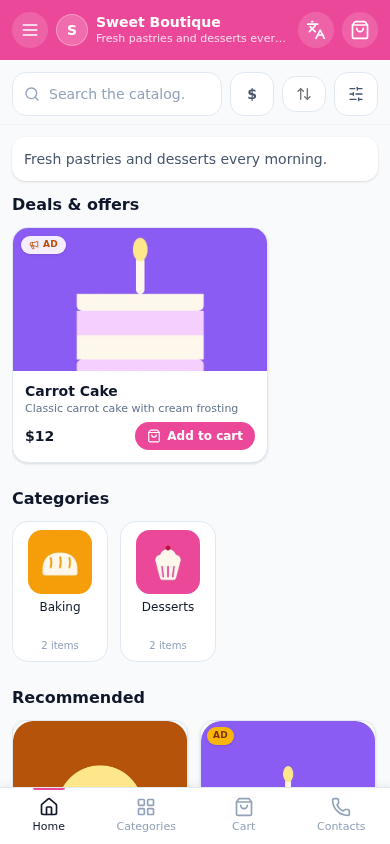
The buyer-facing surface is deliberately minimal. A customer opens the bot and gets:
- a catalog grouped into categories, with photos, prices and stock marks;
- a cart that survives between sessions — add three items today, finish the order tomorrow;
- a checkout with the payment rails you connected;
- an order receipt with a public tracking link.
On your side, the same system maintains the order feed with statuses, the client base with contact details and order history, and stock counters that decrement as orders arrive. Nothing here requires code: the bot is generated from the shop record you fill in.
Catalog and product cards
The catalog is what buyers judge the store by. Each product card carries:
- one or more photos, a title, a description with formatting;
- a price in your display currency, converted from the base currency when the buyer switches;
- stock status — products can be hidden automatically when the counter hits zero;
- a category assignment for navigation.
A practical rule from working stores: 8–15 well-photographed products convert better than a hundred thin cards. The free plan's limit of 15 products is not a handicap for a launch — it is a forcing function for curation.
Cart and checkout flow
The buyer's path is four steps, each one tappable:
- Browse — the catalog opens as a Mini App storefront (full screen inside Telegram) or in any browser as a PWA.
- Add to cart — quantity steppers per product, totals recalculated live.
- Checkout — name, contact, delivery note if relevant; the payment screen offers the rails you connected: Stars for digital goods, card providers for physical ones.
- Receipt — the buyer gets an in-chat confirmation and a receipt link with the order number and status.
Every step lives inside Telegram on mobile — no browser tabs, no logins, no app installs. That is where the conversion advantage comes from: the shorter the path, the fewer the abandoned carts.
Admin panel: orders and stock
The seller side is a cabinet, not a chat log:
- the order feed shows every order as a card with statuses — new, paid, shipped, done — moved with one tap;
- stock counters update from orders and warn before a product runs out;
- the clients tab accumulates every buyer with their order history and lifetime value;
- promo codes and a referral program live in the marketing tab, ready for the first campaign.
The cabinet is also the storefront editor: change a price or a photo, and the buyer-facing catalog updates on the next open. The preview panel shows the storefront exactly as the buyer sees it, in real time.
How to set up in 10 minutes
The mechanical part of the launch is deliberately short:
- Register and open the builder — the launch guide walks through every screen.
- Create the shop: name, description, theme color, currency.
- Add products with photos and prices; group them into 2–3 categories.
- Connect payments in settings — Stars for digital goods, a provider for physical.
- Share the storefront link in your channel and pin the post.
The first test order is the step most sellers skip and should not: place one order yourself, on your own phone, before announcing anything. It takes two minutes and catches the mistakes that cost the first ten buyers.
What you get in the end is a Telegram store bot — same thing under the US name — running on the free plan until the catalog outgrows 15 products. From there, the upgrade path raises the limits without touching the storefront your buyers already know. The catalog tools page details categories, search and variants; the payment methods hub covers both rails and their fees.
Live demo
Pricing
Старт
Free
- 1 магазин и до 15 товаров
- Конструктор каталога с категориями
- Витрина-ссылка для Telegram-канала
- Приём заказов и корзина
- Тестовая оплата (мок)
Pro
690 ₽/mo
- 3 магазина и до 150 товаров
- Онлайн-оплата: Stripe и ЮKassa
- Электронные чеки с юр. данными
- Галереи до 5 фото у товара
- Канбан заказов и статусы доставки
Бизнес
1,490 ₽/mo
- Неограниченные магазины
- До 1000 товаров
- Всё из тарифа Pro
- Расширенная аналитика продаж
- ИИ-ассистент на витрине
All plans include the catalog, orders and a PWA storefront.
FAQ
Related pages
Create your Telegram shop in 10 minutes
Free plan, no credit card. Add products, share the link in your channel and take orders.
Start for free